A fly-through of a famous climb
Some climbs deserve a video of their own. Alpe d'Huez and its hairpins, the bare top of Mont Ventoux, the Stelvio's stacked bends. ToonRoute builds the mountain as a cartoon from the real terrain and map, and films a rider going up it.
Below is Alpe d'Huez, made from a GPX of just the climb: 16 km from Le Bourg-d'Oisans and 1,127 m up. The banner names it and gives the climb as 14 km at 8%, +1,109 m. These are 22 seconds of highlights from the Auto camera.
What a climb video shows
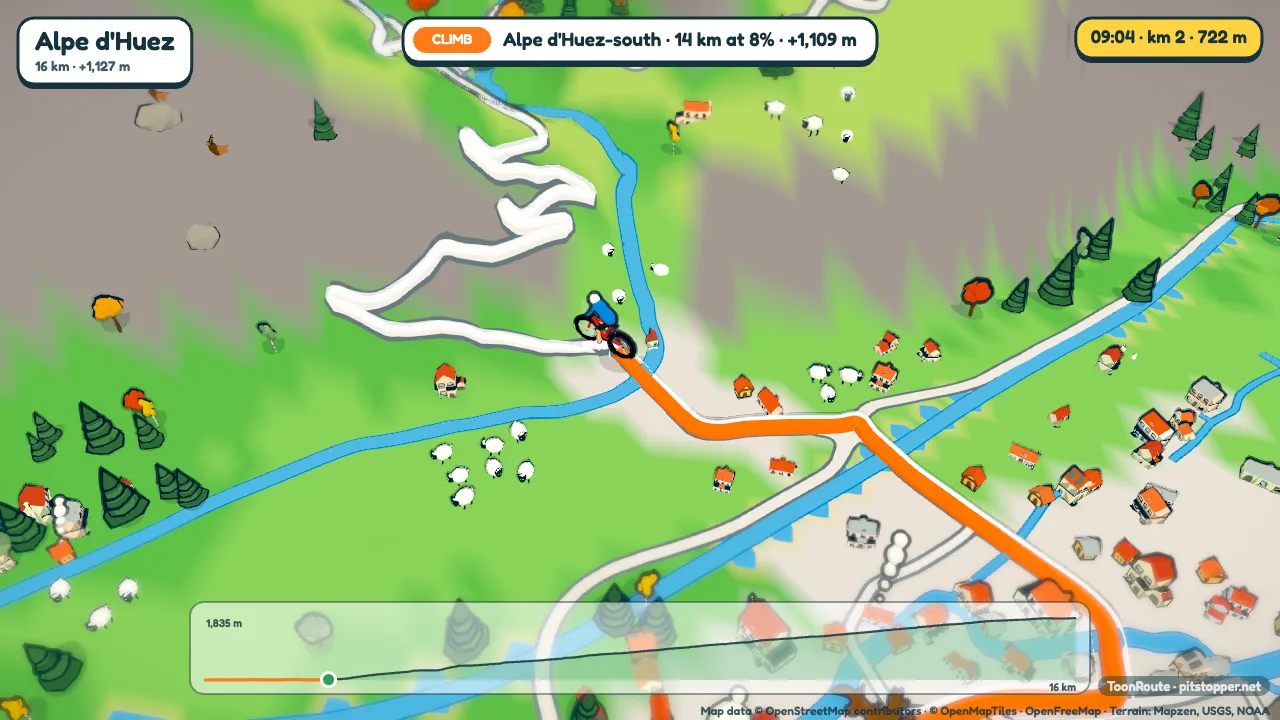
- The banner. As the rider reaches the climb, a banner comes up with its length, average gradient and height gained. If it is one of about 1,200 known climbs on our list, it carries the name too.
- Side-on shots. On Auto the camera films climbs from the side, so you see the slope, and goes high over the hairpins so you see the road fold back on itself.
- The summit. At the top of a big climb the ride slows, and the camera rises off the rider's back and circles the summit once before dropping in behind again.
- The chart. The elevation chart along the bottom fills in as the rider goes up, and the readout gives the height and the distance.
Step by step
- Get a GPX of the climb. Export your own ride up it, or draw it in Create a route: set Go by to Cyclist (road), click the foot and then a point a little over the top.
- Open ToonRoute and choose Use my route file. A single climb is a small area, so the world builds quickly.
- Set Hills to True to life. They are drawn twice their real height to begin with, because a gentle ride looks flat from above. A famous col does not need the help.
- Pick the rider's colours in Character, and give the video a title in the on-screen settings.
- Make the video at 720p, 1080p or 4K, 16:9 or 9:16.
Tips
- Carry the route a couple of kilometres past the top. If the file ends right at the summit, there is no room for the circling shot, and the video goes straight to its closing card. That is what happened in the Alpe d'Huez clip above, as the file stops at the line.
- Start a kilometre or two before the foot, so the banner comes up as the road tilts and not at the very start.
- Your own ride up it, with times in the file, can use As recorded in Character for your real pace: the hard kilometres last longer.
- For a whole day of climbs, such as a stage or a sportive, see the stage guide.
Questions
Which climbs are named?
About 1,200, from cycling climb lists: the big Alpine and Pyrenean cols, the Dolomites, the Spanish and Belgian climbs and plenty in Britain, such as the Bealach na Bà and Hardknott Pass. A climb that is not on the list still gets its banner, with the length, gradient and height, just not a name.
Why does the banner say Alpe d'Huez-south?
Some climbs are on the list once for each way up, with the side added to the name: Mont Ventoux has its east, south and west, the Tourmalet its east and west. The banner uses the name of the side you rode.
How long is the video of one climb?
Never less than a minute. Auto gives about 1.6 seconds to each kilometre with a minute as the least, so a 10 or 20 km climb comes out at a minute of riding, plus the opening and the closing card.
Can I do it on foot, or by car?
Yes. Pick the walker or the car in Character, or a helicopter to fly up the valley. The climb banner and the summit shot work the same.
Is it free?
During the beta, yes: one at a time and up to six a day, at any size. After the beta a video will cost a small amount. The pricing page has the details.
Use my route file Create a route
Other guides
- Turn a GPX file into a video
- A fly-through of your bike ride
- A video of your hike or walk
- A running route video
- Tall videos for Reels and TikTok
- A flight path animation
- A route video for your event
- A cartoon video of your road trip
- A Tour de France stage as a cartoon
- From a Strava activity to a video
- ToonRoute and Relive compared
- Everything ToonRoute does